
Why does a sharp photo still miss the brand?
The scan reads what is in the frame. A clean shot of a vintage jacket can still hide the house label in a pocket. A watch can show every hand and still crop out the reference on the caseback. When you already know the brand, model code, year, or other marker that changes the ID, type that sentence into Notes for the AI and run Re-Identify Item.
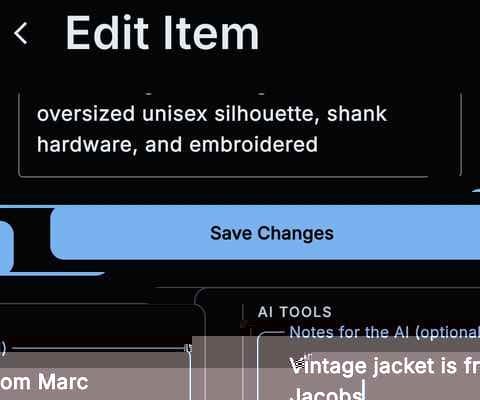
- Open the item, tap the edit pen, and write Notes for the AI in the AI tools block.
- Re-Identify Item saves your changes, re-reads the photos, and overwrites the AI-filled fields.
- It costs one scan from your monthly pool.
- It is at its best on a brand, model code, year, or marker the photos do not show.
How do you re-identify an item with notes for the AI?
- Open the item from View Item.
- Tap the edit pen to open Edit Item.
- Scroll to the AI tools block.
- Write a short sentence in Notes for the AI.
- Tap Re-Identify Item.
What does Re-Identify Item actually do?
The button does what the caption under it says: it saves your changes, re-reads the photos on the item, and overwrites the AI-filled fields. Your note rides with that pass, so the model gets a second look at the same pictures plus the clue you typed. It uses one scan.
What notes actually help?
A short factual sentence beats a paragraph. "Vintage jacket is from Marc Jacobs" is the right shape: brand, and only the extra bit the photos missed. Model codes, catalogue numbers, years, signatures, and "this is a CD, not an LP" work the same way. Skip the life story. The model is looking for a marker, not a memoir.
What does one re-identify cost?
One scan, taken from the same monthly pool as a first scan. Free, Pro, and Ultra all draw from that pool; the plans differ in how many scans you get, not in whether Re-Identify Item is there. If the first note was sloppy, a second pass costs a second scan.
FAQ
Do you need new photos?
No. Re-Identify Item re-reads the photos already on the item. Swap a blurry shot first if you have a clearer one, then run it - the new frame is what the second pass sees.
Does Re-Identify overwrite what you typed?
It saves your changes, then overwrites the AI-filled fields. The note is the hint for that pass. Fields the AI fills can change; that is the point of running it again.
Are notes required?
No. Notes for the AI is optional. Leave it blank if you only want a second read of the photos. Add a sentence when the missing clue lives in your head.
Is this the same as Look up?
Look up is for something you do not own yet: photograph it, get an ID and a market estimate, and leave without filing. Re-Identify Item is for an item already in the catalog, when you want the existing photos read again with a note you already know.
What if the note is wrong?
The model will chase the clue you gave it. A wrong brand or a guessed year can pull the ID off course. Keep the sentence short and something you can stand behind, then run it again if you need to correct it.